
Morten Linderud
For my personal home infrastructure I’ve been using step-ca to have an
internal ACME server for issuing TLS certificates for my .home.arpa domain. I
also intended to use this to sign ssh certificates so I could simplify my SSH
key setup.
And i really like hardware bound keys.
They solve a very concrete problem where even if someone can extract a signing key from your system, they are effectively useless without access to the hardware they where bound to. This hardware could be something like a yubikey, or another FIDO device. But in 2026 most of our machines have a Trusted Platform Module (TPM) that functions as a free hardware enclave we can use to secure our keys with.
I have written two projects that helps with this for general purpose software.
age-plugin-tpm implements a TPM backed encryption keys for the age encryption
software, and ssh-tpm-agent that allows you to have ssh keys created by the
TPM and utilized through the generic ssh-agent protocol.
Which is why I got super excited when I saw that step-ca actually supports
“ACME for device attestation”!
What step-ca supports is a new ACME challenge called device-attest-01. ACME
currently supports several different challenges that enables you to prove the
identity of a domain. The two most popular challenges is http-01 that doesn’t
an HTTP challenge, and dns-01 that does a DNS challenge.
device-attest-01 proves the identity of a device by using attestation and
having a trusted CA sign these statements for authenticity. Others have
explained device attestation far better then me, but the general idea is to have
some hardware enclave, that we deem trustworthy, which signs statements about
the integrity and authenticity of a device. The ACME server then issues a
certificate to the device that attests to the identity of this device. That
means we can use the TPM to create keys and issue certificates to our machines
bound by the identity.
https://datatracker.ietf.org/doc/draft-ietf-acme-device-attest/
Now, the complicated part is that ACME doesn’t do any attestation itself. It relies on a secondary party to say what is and isn’t a valid device. Effectively outsourcing this to an “attestation ca”. Which means we need something to identify our devices.
Luckily we are using step-ca and they support device-attest-01, right?
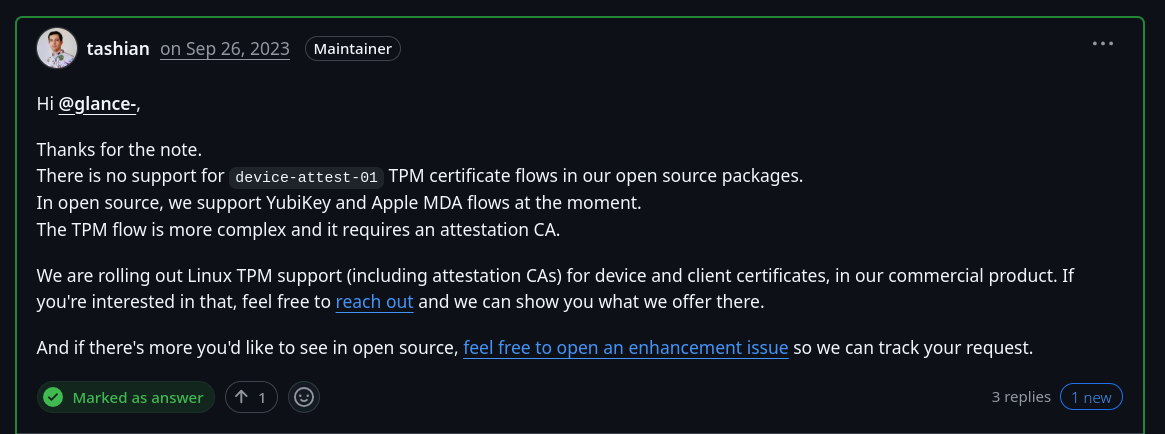
Oh, enterprise only.
But I did write an attestation server 2 years ago to issue short-lived ssh certificates bound to the TPM.
“Writing an attestation ca for step-ca should be easy?” is what told myself 3 months ago.
attezt is my attempt to provide the supported tooling for ACME servers that
implements device-attest-01.
https://github.com/Foxboron/attezt
When people hear “attestation” and “device identity” they fear that this is a
heinous scheme to control our devices. But let me stress that things like
device-attest-01 is practically useless outside of an enterprise public key
infrastructure. Alternatively you, like me, have 2-3 devices and you would like
to hand out access to things you host through short-lived certificates instead
of long-lived certificates you never update.
The project implements a couple of things, but lets focus on the client attezt
and the attestation ca atteztd first.
Note: This project is an entire work in progress. I have not packaged this properly yet, nor provided installation methods. They are expecting to run as root.
Your mileage might vary.
First we will create and setup a CA for our attestation server, and then run the server.
attezt:~# attezt ca create
2026/03/21 16:51:16 Creating certificate authority certificates...
attezt:~# atteztd
2026/03/21 16:57:12 HTTP server listening on :8080
2026/03/21 16:57:12 Varlink socket on /run/attezt/dev.attezt.Server
For the sake of simplicity in this blog post we imagine the server is running
on attezt.home.arpa. It helps make rest of the post make more sense.
For the attestation server to identify our device we need to enroll the hash of our Endorsement Key (EK) into the inventory of our attestation ca. Each TPM has a signed endorsement certificate that pairs with the EK which chains up to the Certificate Authority of the TPM producer.
λ ~ » tpm2_nvread 0x01c00002 > ekpub
λ ~ » openssl x509 -in ekpub -pubkey -noout | openssl pkey -pubin -outform der | sha256sum
2ea8888a4a935bfd418e6a700785655b0d2711abc52e71f1dbeeee03e9650396  -
Here we are reading off the RSA endorsement certificate from our TPM, getting the public key and hashing it. This uniquely identifies a device and we can use this in our attestation ca to verify we are talking with a known and expected machine.
attezt ca implements the server configuration parts of attezt.
attezt:~# attezt ca enroll 2ea8888a4a935bfd418e6a700785655b0d2711abc52e71f1dbeeee03e9650396
attezt:~# attezt ca list
2ea8888a4a935bfd418e6a700785655b0d2711abc52e71f1dbeeee03e9650396
This ensures that attezt is only going to sign certificates from machines that matches one of the EK hashes.
We need to tell our smallstep ACME CA about our new method to provision
certificates. We are going to fetch the certificate chain from attezt and make a
new provision that uses device-attest-01.
I’m assuming here that you are already running a smallstep certificate
authority on your infrastructure, In my case it’s running on ca.home.arpa.
λ ~ » curl -O https://attezt.home.arpa/root.pem
λ ~ » step ca provisioner add acme-da \
   --type ACME \
   --challenge device-attest-01 \
   --attestation-format tpm \
   --attestation-roots ./root.pem
After this is done we should be able to issue new certificates.
The way this is done is that we will make a TPM bound key on our system, and then create an Attestation Key. We have an endorsement key on our system, but to preserve privacy this key can only decrypt things and not sign anything. This ensures that we don’t build systems that would demand us to sign things with a uniquely identifiable key.
Instead we have to take a round trip where the attestation server encrypts a challenge to our Endorsement Key, which we decrypt and then ship to the attestation server. The attestation server will then sign our attestation key, after validating it was created on our system, which is what we will use to sign our device certificate.
The signed device certificate and the attestation key signed by our attestation ca is what gets sent to our ACME server for validation before issuing a certificate.
The attestation format our ACME server accepts is described by the Webauthn standard.
λ ~ » step ca certificate \
  --attestation-uri 'tpmkms:name=device' \
  --attestation-ca-url 'https://attezt.home.arpa' \
  --provisioner acme-da framework device.crt device.tss
✔ Provisioner: acme-da (ACME)
TPM INFO:
Version: TPM 2.0
Interface: kernel-managed
Manufacturer: Nuvoton Technology (<NTC>, 4E544300, 1314145024)
Vendor info: NPCT75x"!!4rls
Firmware version: 7.2
Using Device Attestation challenge to validate "framework" . done!
Waiting for Order to be 'ready' for finalization .. done!
Finalizing Order .. done!
✔ Certificate: device.crt
✔ Private Key: tpmkms:name=device
Cool!
Now we have a new device.crt file which is a device certificate signed by our
ACME server.
“Okay, but what can we use it for?”, you might asking.
And at this point originally I was going to write up a blog post pointing out how I had written a cool new attestation ca server that slots into the smallstep ecosystem. I wanted a demo to prove how it works, but I was stumped.
It turns out the key part of this file is stored as a json blob under
~/.step/tpm and there was no clear way for me to use it. I tried having the
key outputted into several different formats but the step front end would not
let me get anything I could use.
I figured out that smallstep has written an agent to enable PKCS11 sockets for things like browsers or generic signing functionality for enrolled devices.
But it’s proprietary.
Turns out I had to write more things.
Most applications do not understand TPM keys. We need a common format for our
private key and while there are some attempts at standardization it is a bit hit
and miss what is supported where and how. One solution which is somewhat popular
here is to use the p11-kit suite of tools.
PKCS11 is effectively a standard C interface for cryptography devices. It’s
terrible and hard to use and something out of a horror book. However a lot of
things speak PKCS11 so it’s convenient to use this interface. The p11-kit
project implements an RPC client/server architecture that allows us to abstract
away the C ABI into convenient API calls over a socket. It makes it easier for
us to implement a server that can deal with our TPM keys.
attezt-agent is intended as an application that runs as root on a user system
to manage device bound certificates, and serve these over our p11-kit RPC
tunnel. It implements an ACME client that communicated with our smallstep ACME
server.
λ ~ » sudo attezt-agent
2026/03/15 16:33:55 p11kit-server is running
2026/03/15 16:33:55 export P11_KIT_SERVER_ADDRESS=unix:path=/run/attezt/p11kit.socket
2026/03/15 16:33:55 varlink service is running
2026/03/15 16:33:55 Running at: /run/attezt/dev.attezt.Agent
It effectively runs in the background and provides a varlink service that our
attezt client can talk through, and a p11-kit socket for our PKCS11 needs.
At this point we just need to replace our calls with step with our new
attezt client and we can issue our own device certificates from our ACME
server.
λ ~ » attezt status
Status:
    Endorsement Key: 2ea8888a4a935bfd418e6a700785655b0d2711abc52e71f1dbeeee03e9650396
  Enrollment status: false

λ ~ » attezt enroll --acme "https://ca.home.arpa/acme/acme-da" --attestation "https://attezt.home.arpa"
λ ~ » attezt status
Status:
    Endorsement Key: 2ea8888a4a935bfd418e6a700785655b0d2711abc52e71f1dbeeee03e9650396
  Enrollment status: true
        ACME Server: https://ca.home.arpa/acme/acme-da
 Attestation Server: https://attezt.home.arpa

Certificate chain:
X.509v3 TLS Certificate (RSA 2048) [Serial: 9209...5502]
  Subject:     framework
  Issuer:      Linderud Internal CA Intermediate CA
  Provisioner: acme-da
  Valid from:  2026-03-21T21:24:05Z
          to:  2026-03-22T21:24:05Z

X.509v3 Intermediate CA Certificate (ECDSA P-256) [Serial: 3050...3071]
  Subject:     Linderud Internal CA Intermediate CA
  Issuer:      Linderud Internal CA Root CA
  Valid from:  2026-01-03T15:15:45Z
          to:  2036-01-01T15:15:45Z
Tada! It works!
Currently we only issue short-lived 24 hour certificates.
Now we can query our TPM keys with the pkcs11-tool.
λ ~ » export P11_KIT_SERVER_ADDRESS=unix:path=/run/attezt/p11kit.socket
λ ~ » pkcs11-tool --module /usr/lib/pkcs11/p11-kit-client.so --list-slots
Available slots:
Slot 0 (0x1): Attezt Attestation Agent
  token label        : Attestation Trust
  token manufacturer : attezt
  token model        : attezt-agent
  token flags        : token initialized, readonly
  hardware version   : 0.1
  firmware version   : 0.1
  serial num         : 12345678
  pin min/max        : 0/0
  uri                : pkcs11:model=attezt-agent;manufacturer=attezt;serial=12345678;token=Attestation%20Trust

λ ~ » pkcs11-tool --module /usr/lib/pkcs11/p11-kit-client.so --list-objects
Using slot 0 with a present token (0x1)
Certificate Object; type = X.509 cert
  label:      Attezt TPM Certificate
  subject:    DN: CN=framework
  serial:     D47FCD127ACCB2133B8163B2AA27CBE6
  ID:         ef1e59d6a7a29acc13f08fd4921191a6fae563ce
  uri:        pkcs11:model=attezt-agent;manufacturer=attezt;serial=12345678;token=Attestation%20Trust;id=%ef1e59d6a7a29acc13f08fd4921191a6fae563ce;object=Attezt%20TPM%20Certificate;type=cert
Private Key Object; RSA
  label:      Attezt TPM key
  ID:         ef1e59d6a7a29acc13f08fd4921191a6fae563ce
  Usage:      decrypt, sign
  Access:     sensitive, always sensitive, never extractable
  uri:        pkcs11:model=attezt-agent;manufacturer=attezt;serial=12345678;token=Attestation%20Trust;id=%ef1e59d6a7a29acc13f08fd4921191a6fae563ce;object=Attezt%20TPM%20key;type=private
Certificate Object; type = X.509 cert
  label:      Intermediate Certificate
  subject:    DN: O=Linderud Internal CA, CN=Linderud Internal CA Intermediate CA
  serial:     E57E41F6144D9C599B87D39322A7C57F
  ID:         20b13640446a2c2329b76dca2d83d7c7c6ed1b63
  uri:        pkcs11:model=attezt-agent;manufacturer=attezt;serial=12345678;token=Attestation%20Trust;id=%20b13640446a2c2329b76dca2d83d7c7c6ed1b63;object=Intermediate%20Certificate;type=cert
Public Key Object; EC  EC_POINT 256 bits
  EC_POINT:   044104b83d658c14a7e623f2c07f1755e890d1de85abf6042cc395df98e82169e26154a406e481e9291a535622da2b73a1ad9ccdabeb2e48968b7dd45e7ca4feb0e2c4
  EC_PARAMS:  06082a8648ce3d030107 (OID 1.2.840.10045.3.1.7)
  label:      Intermediate Certificate Public Key
  ID:         20b13640446a2c2329b76dca2d83d7c7c6ed1b63
  Usage:      verify
  Access:     none
  uri:        pkcs11:model=attezt-agent;manufacturer=attezt;serial=12345678;token=Attestation%20Trust;id=%20b13640446a2c2329b76dca2d83d7c7c6ed1b63;object=Intermediate%20Certificate%20Public%20Key;type=public
And we have TPM keys! In the future I plan on making them renew automatically and so on. But this will make our demos much easier to deal with.
So finally, now we can use our device bound certificates to do some authentication. For the sake of this demonstration I will be using our certificate for mTLS authentication.
I will set up a quick nginx server on mtls.home.arpa that only allows
authenticated devices to communicate with it.
# curl https://attezt.home.arpa/root.pem > /etc/nginx/ca.crt
# cat /etc/nginx/nginx.d/30-mtls.home.arpa.conf

server {
    listen 443 ssl;
    listen [::]:443 ssl;
    server_name mtls.home.arpa;

    access_log /var/log/nginx/mtls.access.log;
    error_log /var/log/nginx/mtls.error.log;

    ssl_protocols TLSv1.2 TLSv1.3;
    ssl_session_cache off;
    ssl_client_certificate /etc/nginx/ca.crt;
    ssl_verify_client      on;

    include snippets/acme-internal.conf;

    location / {
        if ($ssl_client_verify != SUCCESS) { return 403; }
        add_header Content-Type 'text/html; charset=utf-8';
        return 200 '<html><body>Hello Worrld</body></html>';
    }
}
This configuration should allow nginx to only forward a 200 OK if we have
authenticated. We will use curl to test!
λ » curl https://mtls.home.arpa
<html>
<head><title>400 No required SSL certificate was sent</title></head>
<body>
<center><h1>400 Bad Request</h1></center>
<center>No required SSL certificate was sent</center>
<hr><center>nginx/1.28.1</center>
</body>
</html>
Ohno, we can’t authenticate.
Lets help curl by telling it to use the p11-kit-client.so PKCS11 module,
which should communicate with our p11-kit RPC server.
Note that I had to install libp11 for pkcs11 to work with curl on Arch Linux.
λ ~ » export PKCS11_MODULE_PATH=/usr/lib/pkcs11/p11-kit-client.so
λ ~ » export P11_KIT_SERVER_ADDRESS=unix:path=/run/attezt/p11kit.socket
λ ~ » curl --key 'pkcs11:object=Attezt%20TPM%20key;type=private' --cert /var/lib/attezt/device.crt https://mtls.home.arpa
<html><body>Hello World</body></html>%
And we have authenticated!
You can also use this with a browser like qutebrowser or chromium, but it
requires a bit more setup.
First you need to tell nssdb about the PKCS11 library,and we need to ensure
P11_KIT_SERVER_ADDRESS is exported, as we have done previously.
λ ~ » modutil -dbdir ~/.pki/nssdb -add attezt -libfile /usr/lib/pkcs11/p11-kit-client.so
λ ~ » export P11_KIT_SERVER_ADDRESS=unix:path=/run/attezt/p11kit.socket
Now, we also need to tell chromium that we want to use a certificate for some
urls. This can be done by specifying a policy.
λ ~ » cat /etc/chromium/policies/managed/mtls.json
{
  "AutoSelectCertificateForUrls": [
    "{\"pattern\":\"https://mtls.home.arpa\",\"filter\":{\"ISSUER\":{\"O\":\"Linderud Internal CA\"}}}"
  ]
}
At which point chromium should use our PKCS11 agent to authenticate with the TLS server by looking for certificates issues by my internal CA “Linderud Internal CA”.
attezt is a work in progress and I don’t expect anyone to deploy this into
production. But if people find FOSS tooling around this interest then come join
hack on it.
The attestation protocol is currently only something smallstep implements, it
would be nice with something generic here. The inventory system is rudimentary,
but it works for EK hash enrollment. Patches welcome and I promise no warranty.
Yes, well. About that.
It turns out that step-ca doesn’t provide a way for me to sign my ssh
certificates through ACME and my attestation server. However I have some
motivation to see how much of this I can hack together at this point.
ACME allows us to specify the certificate bundle type through Content-Type.
This could probably be used to issue an ssh certificate instead.
If we want SSH certificates we also need a way to validate, or attest, to
different principals, where I wonder if the IMA subsystem in Linux or systemd
can maybe record the hostname and available users into the TPM eventlog for
attestation. This could also be delegated to the inventory system.
At this point we just need a way to tell ACME which properties we want into the issues certificate.
I suspect this could be hacked together for personal use, but I’m not sure how something people would like to use for serious use would look like.
Thanks to everyone who has been helpful answering questions I’ve had on these topics! Would never have survived half of the topics involved otherwise.